Use of AI Agents to enrich and generate TI Feeds based on Security News and Reports ( + KQL Query)
Finally! Posting something about AI!
I have to admit that I’m still not fully confident using AI-related tools due to the constant news about breaches, vulnerabilities, or compromised accounts affecting different AI solutions. However, that doesn’t mean I’m not starting to explore and enjoy this new ‘toy’ we now have in our hands.
At the moment and until I am sure I can manage the security of these new tools, I’m applying what I would call a “hacked-trust” approach: creating new email accounts or services where I don’t store any critical information. That way, if something ever gets compromised, the impact will be have to create new email or git accounts.
Creating TI Feeds based on Security news and IOC Reports
One of the biggest challenges I face daily is keeping up with new attacks, trends, statistics, and reports that may contain valuable IOCs. Reading, understanding, extracting, and integrating all that information manually is extremely time-consuming.
That’s where the idea of testing Claude AI came to my mind. I started by generating a daily email summarizing this information, which was already a good first step to evaluate the content over time. Once I became more comfortable with the results, I decided to go a step further and create a repository to centralize everything.
If you want to do something similar, the process is actually pretty simple: configure Claude, provide access through a dedicated email account and/or Git repository token, and create a scheduled pipeline to automatically collect and update the content.
In this case I am adding all the IOCs exported from 2 sources : CyberSecurityNews and Ransomware.live.
- Ransomware.live provides a very easy way to track new ransomware victims, groups, and related activity almost in real time.
- CyberSecurityNews is useful to extract IOCs, trends, and technical details from newly published cybersecurity incidents and research articles.
Of course, if you want to add additional content while experimenting with Claude or any other AI solution, just be careful to avoid duplicating information. Unfortunately, nowadays we already have too much copy-paste content everywhere or fake wizards that promise original content.
KQL Query based on Reports and Articles
So here we are, building a query based on the TI Feed containing the collected IOCs. As you can imagine, the referenced articles and news reports may contain different types of indicators. That’s why I started grouping them into distinct cases.
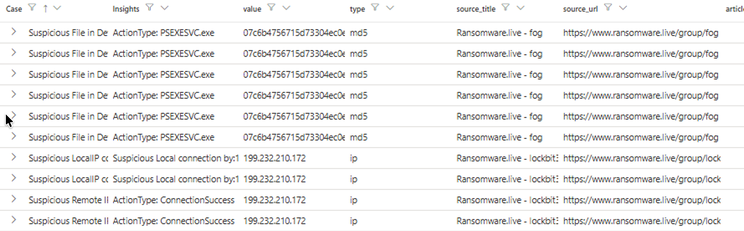
This is only an initial set of possible matches, but it can easily be extended with additional ideas such as validating registry keys, file paths, and many other. That’s one of the biggest advantages and challenges of AI: bringing new ideas faster and pushing detections to the next level. Feel free to expand it and build your own advanced detection scenarios.
- Case0 — Clicked URL: Detects malicious URLs found in email communications.
- Case1_1 — Suspicious Sender: Detects emails sent from suspicious sender addresses.
- Case1_2 — Suspicious Recipient: Detects emails sent to suspicious recipient addresses.
- Case2_1 — Suspicious Sender Domain: Detects emails sent from suspicious sender domains.
- Case2_2 — Suspicious MAIL FROM Domain: Detects emails using suspicious MAIL FROM domains.
- Case3 — Suspicious Email IP: Detects emails originating from suspicious IP addresses.
- Case4_1 — Malicious Attachment: Detects malicious email attachments using SHA256 hashes.
Take attention to Cases number 5, because it can include communications to Telegram or other services where the IPs were previously abused or used for malicious activities, but can easily be rotated and later become legitimate again. You can tune or comment out Case5 if you want to achieve more accurate true positives and reduce potential noise depending on your environment.
- Case5_1 — Suspicious Remote IP Connection: Detects successful device connections to suspicious remote IPs.
- Case5_2 — Suspicious Local IP Activity: Detects suspicious local IP activity on devices.
- Case6_1 — Suspicious SHA256 File: Detects device files matching malicious SHA256 hashes.
- Case6_2 — Suspicious MD5 File: Detects device files matching malicious MD5 hashes.
- Case6_3 — Suspicious Sign-in Attempt: Detects Entra ID sign-ins from suspicious IP addresses.
- Case7 — Suspicious Process Execution: Detects processes executed through suspicious remote session IPs.
let IOCFeed = externaldata(type:string,value:string,source_url:string,source_title:string,article_published_at:string,first_seen:string)
[@‘https://raw.githubusercontent.com/Sergio-Albea-Git/Threat-Hunting-KQL-Queries/ee65c40ca7ed716a693c5c1b6cc779416e4571a1/Daily-IOCReportsCollection/iocs.csv’]with(format='csv’, ignoreFirstRecord=true);
//Email Events**
//Malicious URL
let Case0=IOCFeed| where type has ‘url’ | join kind=inner (EmailUrlInfo | extend URL = tostring(Url) | summarize by URL, UrlDomain,   UrlLocation) on $left.value == $right.URL | summarize by Case=‘Clicked URL’,Insights=strcat('URL: ',URL),Asset_Affected=strcat(‘Type:’,UrlDomain),value,type,source_title, source_url,article_published_at,first_seen;
//Malicious Email Address
let Case1_1=IOCFeed| where type has ‘email’ | join kind=inner (EmailEvents | extend sender = tostring(SenderMailFromAddress) | summarize by sender,Subject,RecipientEmailAddress) on $left.value == $right.sender
| summarize by  Case=‘Suspicious Sender’,Insights=strcat('MailSubject: ',Subject),Asset_Affected=strcat(‘Recipient:’,RecipientEmailAddress),value,type,source_title, source_url,article_published_at,first_seen;
let Case1_2=IOCFeed| where type has ‘email’ | join kind=inner (EmailEvents | extend recipient = tostring(RecipientEmailAddress) | summarize by recipient,Subject,RecipientEmailAddress) on $left.value == $right.RecipientEmailAddress
| summarize by  Case=‘Suspicious Sender’,Insights=strcat('MailSubject: ',Subject),Asset_Affected=strcat(‘Recipient:’,RecipientEmailAddress),value,type,source_title, source_url,article_published_at,first_seen;
//Malicioud Domain
let Case2_1=IOCFeed| where type has ‘domain’ | join kind=inner (EmailEvents | extend senderDomain = tostring(SenderFromDomain) | summarize by senderDomain,Subject,RecipientEmailAddress) on $left.value == $right.senderDomain
| summarize by Case=‘Email sent by Suspicious Domain’,  Insights=strcat('Subject: ',Subject),Asset_Affected=strcat(‘Recipient:’,RecipientEmailAddress),value,type,source_title, source_url,article_published_at,first_seen;
let Case2_2=IOCFeed| where type has ‘domain’ | join kind=inner (EmailEvents | extend senderDomain = tostring(SenderMailFromDomain) | summarize by SenderMailFromDomain,Subject,RecipientEmailAddress) on $left.value == $right.SenderMailFromDomain
| summarize by Case=‘Email sent by Suspicious Domain’,  Insights=strcat('Subject: ',Subject),Asset_Affected=strcat(‘Recipient:’,RecipientEmailAddress),value,type,source_title, source_url,article_published_at,first_seen;
//Malicious SenderIP
let Case3=IOCFeed| where type has ‘ip’ | join kind=inner (EmailEvents | summarize by senderIP = iff(isnotempty(SenderIPv4),SenderIPv4,SenderIPv6),Subject,RecipientEmailAddress) on $left.value == $right.senderIP
| summarize by Case=‘Email sent by Suspicious IP’,  Insights=strcat(‘Subject: ‘,Subject),Asset_Affected=strcat(‘Recipient:’,RecipientEmailAddress),value,type,source_title, source_url,article_published_at,first_seen;
// Malicious Attachment
let Case4_1=IOCFeed| where type has ‘sha256’ | join kind=inner (EmailAttachmentInfo | extend Attachment = tostring(SHA256) | summarize by SHA256, FileName,   FileType) on $left.value == $right.SHA256 | summarize by Case=’ Attachment File’,Insights=strcat('File: ',FileName),Asset_Affected=strcat(‘FileHash:’,SHA256),value,type,source_title, source_url,article_published_at,first_seen;
//Device Network Connections
let Case5_1=IOCFeed| where type has ‘ip’ | join kind=inner (DeviceNetworkEvents | where ActionType has ‘ConnectionSuccess’ | summarize by RemoteIP,ActionType,DeviceName) on $left.value == $right.RemoteIP | summarize by Case=‘Suspicious Remote IP connection established’,value,type,Insights=strcat('ActionType: ',ActionType),Asset_Affected=strcat(‘Device:’,DeviceName),source_title, source_url,article_published_at,first_seen;
let Case5_2=IOCFeed| where type has ‘ip’ | join kind=inner (DeviceNetworkEvents | summarize by LocalIP,ActionType,DeviceName,RemoteIP) on $left.value == $right.LocalIP | summarize by  Case=‘Suspicious LocalIP connection established’, value,type,Insights=strcat(‘Suspicious Local connection by:’,LocalIP),Asset_Affected=strcat(‘Device:’,DeviceName),source_title,source_url,article_published_at,first_seen;
// Device File Events
let Case6_1=IOCFeed| where type has ‘sha256’ | join kind=inner (DeviceFileEvents | extend Attachment = tostring(SHA256) | summarize by FileName,SHA256,DeviceName) on $left.value == $right.SHA256
| summarize by value,type,Insights=strcat('ActionType: ',FileName),Asset_Affected=strcat(‘Device:’,DeviceName),source_title, source_url,article_published_at,first_seen;
let Case6_2=IOCFeed| where type has ‘md5’ | join kind=inner (DeviceFileEvents | extend Attachment = tostring(MD5) | project FileName,Attachment,DeviceName) on $left.value == $right.Attachment
| summarize by  Case=‘Suspicious File in Device’,value,type,Insights=strcat('ActionType: ',FileName),Asset_Affected=strcat(‘Device:’,DeviceName),source_title, source_url,article_published_at,first_seen;
let Case6_3=IOCFeed| where type has ‘ip’ | join kind=inner (EntraIdSignInEvents | extend IP_Ext = tostring(IPAddress) | summarize by IP_Ext,AccountDisplayName,Application,ErrorCode) on $left.value == $right.IP_Ext
| summarize by  Case=‘Sign-in attempt from Suspicious IP’,value,type,Insights=strcat(‘ActionType: ‘,ErrorCode),Asset_Affected=strcat(‘User:’,AccountDisplayName),source_title, source_url,article_published_at,first_seen;
// Suspicious Sign-in Attempts
let Case7=IOCFeed| where type has ‘ip’ | join kind=inner (DeviceProcessEvents | summarize by SHA256,FileName,DeviceName,InitiatingProcessRemoteSessionIP,AccountName) on $left.value == $right.InitiatingProcessRemoteSessionIP
| summarize by Case=‘Suspicious Process ‘, value,type,Insights=strcat(‘Executed:’,FileName,’ CMD:’,InitiatingProcessRemoteSessionIP),Asset_Affected=strcat(‘Device:’,DeviceName,’ User:’,AccountName),source_title,source_url,article_published_at,first_seen;
union Case0,Case1_1,Case1_2,Case2_1,Case2_2,Case3,Case4_1,Case5_1,Case5_2,Case6_1,Case6_2,Case6_3,Case7
Enriching TI Feeds base on your needs
Some time ago, I wrote about the importance of IOC evaluation to better differentiate between generic indicators and those that are truly relevant to our own environment. For that purpose, I created the MATCH-4 model (Full Article).
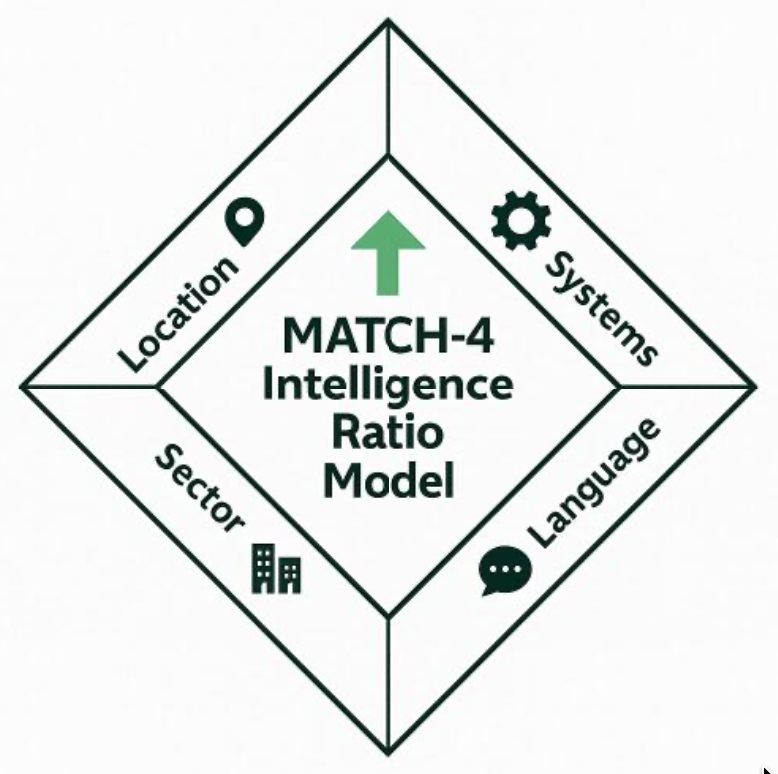
Previously, I had to rely on manual or static evaluations to analyze these cases. However, this is rapidly changing with the arrival of AI Agents. In this second example, I am also using Claude together with a public GitHub repository focused on phishing (https://phishunt.io/feed.csv). What I asked Claude to do was to replicate and enrich the content in my GitHub repository by automatically adding new fields such as the language of the URL and the targeted sector.
This becomes useful from a detection engineering perspective. For example, I can create detections that generate high-priority alerts when the IOC sector matches my environment, such as Education, or when the URLs are written in German or French (as I am based on Switzerland). On the other hand, I can assign lower priority levels to less relevant URLs and indicators.
This is where AI Agents start becoming really powerful: not only consuming Threat Intelligence, but contextualizing and adapting it to our own environment automatically.
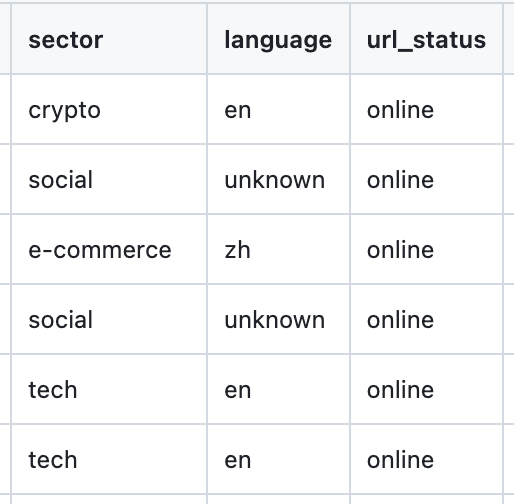
You have the example in this repo : https://github.com/Sergio-Albea-Git/Threat-Hunting-KQL-Queries/blob/main/TIFeeds_Enrichment/phishunt_enriched.csv which as I said previously and give the corresponding credits, is a Per-URL enrichment of the source phishunt.io phishing feed. You can test it using the following KQL Query based on Emails with URLs included:
let Lookback = 30d;
let PhishingFeed = externaldata(Url:string,Domain:string,TargetBrand:string,FeedUpdatedAt:datetime,FirstSeen:datetime,PhishId:string,IPAddress:string,Country:string,ASN:int,ASNName:string,CertIssuer:string,HasLogin:bool,HasForm:bool,HasMicrosoft:bool,HasCrypto:bool,IsOnline:bool,Sector:string,Language:string,Status:string,Screenshot:string)
[‘https://raw.githubusercontent.com/Sergio-Albea-Git/Threat-Hunting-KQL-Queries/6f41a801a60f65bae1fc38b8ed659bcf7e5f6129/TIFeeds_Enrichment/phishunt_enriched.csv’]
with (format=‘csv’, ignoreFirstRecord=true);
PhishingFeed
| extend FeedUrl=tolower(Url), FeedDomain=tolower(Domain)
| join kind=inner (
    EmailUrlInfo
    | where Timestamp > ago(Lookback)
    | extend EmailUrl=tolower(Url), EmailDomain=tolower(tostring(parse_url(Url).Host))
    | join kind=inner (
        EmailEvents
        | where Timestamp > ago(Lookback)
        | project NetworkMessageId, Timestamp, Subject, SenderFromAddress, SenderMailFromAddress, RecipientEmailAddress, DeliveryAction, DeliveryLocation, ThreatTypes, DetectionMethods, ReportId
    ) on NetworkMessageId
) on $left.FeedUrl == $right.EmailUrl
| project Timestamp, ReportId, Case=‘Phishing URL Received - Exact URL Match’, Subject, SenderFromAddress, SenderMailFromAddress, RecipientEmailAddress, DeliveryAction, DeliveryLocation, ThreatTypes, DetectionMethods, MatchedUrl=EmailUrl, FeedUrl, FeedDomain, TargetBrand, Sector, Language, Status, IsOnline, FirstSeen, FeedUpdatedAt, IPAddress, Country, ASN, ASNName, Screenshot, NetworkMessageId
Conclusion
We are entering a new era where we need to speed up our onboarding into AI stuff if we want to be able to fight against the new threats that are also coming with AI. Malicious actors are already going further and one step beyond — at least that’s my personal feeling.
Think about those repetitive tasks that consume your time daily and could be automated to let you focus on more valuable things: investigations, detections, threat hunting, analysis, or simply learning new skills instead of spending hours collecting and organizing information manually.
Use of AI Agents to enrich and generate TI Feeds based on Security News and Reports ( + KQL Query) was originally published in Detect FYI on Medium, where people are continuing the conversation by highlighting and responding to this story.
Introduction to Malware Binary Triage (IMBT) Course
Looking to level up your skills? Get 10% off using coupon code: MWNEWS10 for any flavor.
Enroll Now and Save 10%: Coupon Code MWNEWS10
Note: Affiliate link – your enrollment helps support this platform at no extra cost to you.
1 post - 1 participant
Malware Analysis, News and Indicators - Latest topics

Sp123
"An underestimated security threat to organizations is employee apathy and burn out."
