Testing AI Threat Hunting against Real-World KQL: A Side-by-Side Test
A real-world experiment revealing where AI excels and where it still struggles. Here’s an honest breakdown of the gap.
The ones that follow this blog long enough know that I write SPL for a living. It's almost 10 years as an independent consultant since working for Splunk itself and I can't get enough of it.
However, one thing has changed in the last 3–4 years: the Microsoft Defender ecosystem has grown massively. As a result, I now spend just as much time writing KQL as I do writing queries in Splunk’s query language.
Some of my customers, as one can guess, use Splunk Enterprise Security as a SIEM and Defender as an EDR which enables me to work with some of the high-end products in enterprise SIEM/XDR market.
In this article, I put AI-generated queries head-to-head against the hunting logic I craft for real customer environments and let the results speak for themselves.
 "Picture a human reviewing a robot's work — in a beautiful office space in Porto/Portugal!" <- How much time until it's the other way around?
 Disclaimer: I honestly consider Threat Hunting a required discipline (or skill for that matter) for any serious Detection Engineer. Wanna check my full take on that topic? Go check it here or here.
English, Python & KQL: just another language?
It’s no big news that modern AI models can read, write, and even converse in English at a remarkably human level.
That also applies to Portuguese, Spanish and many other languages, including programming languages such as C# or Python.
Rest assured, most of my recent articles have gone through the eyes of an LLM, and I’ve learned a great deal from the process.
So what prevents an LLM-based chatbot from coding in SPL or KQL? There are some factors to consider and they matter more than you’d think.
Training Data x Training Exposure
Let's start with the Training Data, a major factor. For perspective, there is an enormous amount of publicly available Python code that can be used as training data:
- GitHub
- Stack Overflow
- Documentation
- Books
- Tutorials
Now, compare that to a data query language such as KQL or SPL, the difference is brutal.
- Technology Age
While Python has been around for more than 35 years, Splunk’s SIEM has been on the market for roughly 15 years, and Kusto is not far behind. However, KQL only started gaining widespread adoption in cybersecurity with the launch of Microsoft’s SIEM in 2019. - Public Code Repositories
Besides vendors, there are not that many individuals or community projects consistently publishing new, solid code. Here are some good resources, just in case.
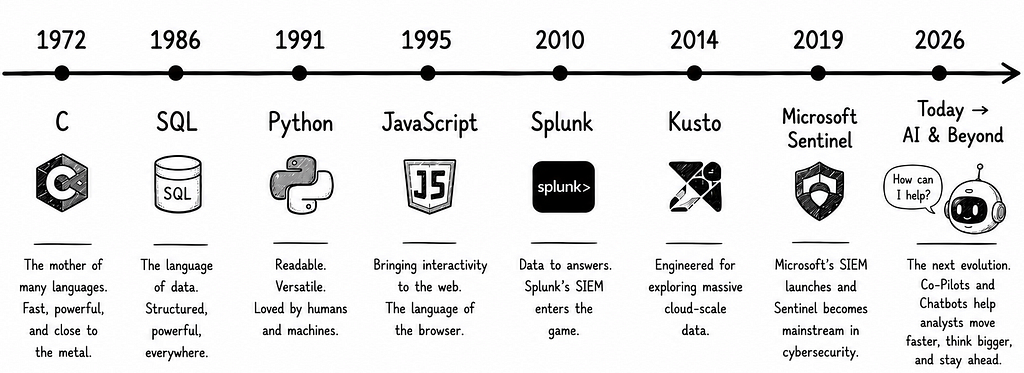 There's roughly 5–6 years of public, security-logs-focused, KQL code out there, and that doesn't tell the complete story.
Now, let's shift to Quantity x Quality since not all queries are created equal!
While most people think 'more data' will eventually solve the problem, there are many other aspects to consider, for instance, Training Data Exposure.
Consider you're studying for an exam. Your training data is the set of books and notes available to you. Your training exposure is how much time you actually spend studying them and which chapters you reviewed the most.
You could have access to every book in a library (vast data) but if you only skimmed each one (low exposure), you’ll underperform compared to someone who deeply studied a smaller, well-chosen set.
That’s when the quality starts to matter and we start to notice the difference between distinct models, depending on the use case.
A model fine-tuned on security/log data and query languages would likely outperform a general-purpose one.
That's particularly true when it comes to distinguishing between a trivial lookup and a complex, multi-stage analytical query.
Prepending "Consider yourself an experienced log analysis wizard" will not change much unless the model training is done right.
Schema Awareness & Data Normalization
A model can memorize query syntax but without knowing where to find the data and how it's structured, it's still writing queries for a table (or index) that may not exist, with fictitious fields.
One thing is a two-dimensional tabular data where columns represent the field names; and rows, the actual values (data). For unstructured data, a plain version string such as "1.2.3.4" might look like an IP address.
This is one of the most underappreciated failure modes in deploying LLMs for data tasks. Most people think it’s all about the amount of training data available, but one of the biggest challenges lies in collecting, cleaning, and preparing that data.
There's a multitude of log data sources available and sometimes the very same data source is available in different formats or distinct schemas. Many vendors are now gravitating towards OCSF, which reminds me why our industry sometimes fits perfectly in a meme or a Dilbert comic strip:
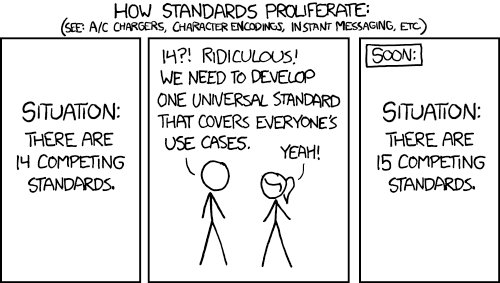
Jokes apart, here I must highlight a clear advantage of schema-full platforms such as Defender or any schema-on-write models.
The Device* tables are likely structured the same regardless of the environment/customer, which helps both humans and agents better perform hunting and detection across multiple tenants.
Domain Knowledge
A model can produce syntactically correct, semantically plausible-looking queries that are completely useless in practice.
Concrete KQL example:
DeviceProcessEvents
| where FileName == "powershell.exe"
| where ProcessCommandLine contains "Invoke-Mimikatz"
| summarize count() by DeviceName
This looks completely reasonable to a non-expert.
But in practice it’s nearly useless because:
- Real Mimikatz invocations are never that literal in the command line since attackers rename the binary, encode the command, or run it completely from memory using various methods.
- A query hunting for the string Invoke-Mimikatz will catch almost no real threat while giving the user the false sense of detection coverage.
Above query runs. It might return results. It even looks like proper threat hunting. But it wouldn’t catch an actual attack.
And I'm not speaking about the common AI slops such as hallucinations where a SPL/KQL function or command that never existed is suggested by the model. I mean it's simply not production-ready.
Even after exposed to a large corpus of queries and data, the model may struggle to reason about it, and therefore still perform bad at hunting.
Here are few more factors to consider:
- Lack of best practices / frameworks
Some say coding is an art. That freedom is sometimes a curse or a blessing. The fact is coding style, just like any other attribute will influence how a learner will later perform. The same holds true when you teach models. What makes up a solid SIEM query? - Statistics/Analytics Illiteracy
Today, log telemetry is richer and highly available, near real time lookback period is past. Besides, many threat hunters still lack foundational stats knowledge required for advanced use cases. - Most Detections are Closed Source by Nature
Many real-world detections live in private SIEMs and internal repositories. While ideas are eventually shared through blogs, conferences, and open-source projects, there is often a delay between creation and disclosure. Much like zero-days and new attack techniques, this reduces the amount of publicly available training data.
In a nutshell, despite having access to rich documentation, an LLM model might excel at Python simply because it has seen millions more production-level examples as compared to KQL, for instance.
The Hunt: Robot x Human
I have been mostly using LLMs to suggest me KQL code snippets to solve a very specific problem or as a means to avoid going to Google or querying the vast documentation.
However, the more fluent you get, the less you rely on AI and the faster and more confidently you can express and validate your own ideas.
A composite detection query or detection model might take some hundred lines, we are not speaking about thousands or millions of lines of code you see for a full blown ERP or an Apache project.
In practice, I find more value in using AI to prototype and review discrete building blocks than in iteratively refining a complete solution proposed by the model.
For straightforward coding tasks, such as implementing an entropy function or translating an algorithm into KQL, the models generally produced usable results, requiring only minor tweaks.
Now, how do they perform when it comes to a more comprehensive task such as a full hunt query with multiple requirements and specific scope?
Let's find out.

The Hunt Prompt
I know there are many improvements applicable to the following prompt. I've seen people using an LLM to actually generate the prompt itself!
However, the idea is to assume an average user is going to use LLMs to prototype a hunt query, so no need to go fancier than that here.
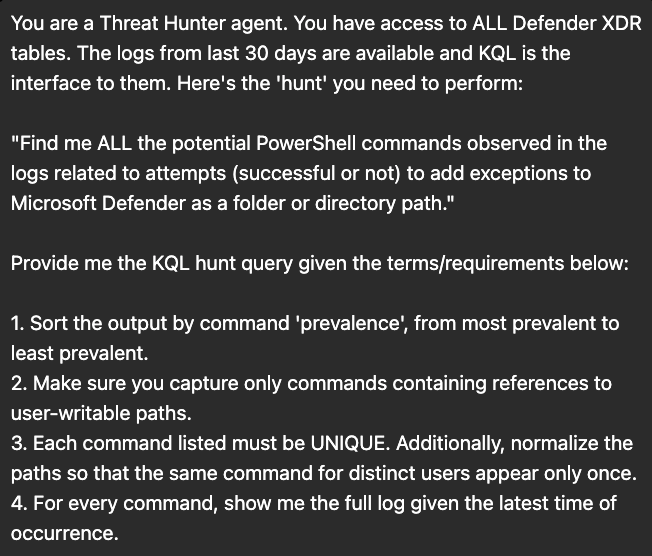 The Prompt — Asking for a KQL Hunt Query
The Answers
Without any further research, I simply picked two top-tier vendors in this space, OpenAI's ChatGPT (GPT-5.5) and Anthropic's Claude (Sonnet 4.6).
Right of the bat, only one of the queries provided actually worked! Guess which one?
I should say that after comparing notes, I also learned a few things! I am breaking down the main points below.
ChatGPT (GPT-5.5) query returned:
let DefenderExclusionCommands =
DeviceProcessEvents
| where Timestamp >= ago(30d)
| where FileName in~ ("powershell.exe","pwsh.exe","powershell_ise.exe")
| where ProcessCommandLine has_any ("Add-MpPreference","Set-MpPreference")
| where ProcessCommandLine has "-ExclusionPath"
//
// Normalize common user-specific writable paths
//
| extend NormalizedCommand =
    ProcessCommandLine
    // C:\Users\<user>\
    |> replace_regex(@"(?i)C:\\Users\\[^\\\s""']+", @"C:\Users\<USER>")
    // SID-based profiles
    |> replace_regex(@"(?i)S-1-5-21-(\d+-){3}\d+", "<SID>")
    // Environment variables
    |> replace_regex(@"(?i)%USERPROFILE%", "%USERPROFILE%")
    |> replace_regex(@"(?i)%APPDATA%", "%APPDATA%")
    |> replace_regex(@"(?i)%LOCALAPPDATA%", "%LOCALAPPDATA%")
//
// Extract the exclusion path for filtering
//
| extend ExclusionPath =
    extract(@"(?i)-ExclusionPath\s+(""[^""]+""|'[^']+'|[^\s,;]+)", 1, ProcessCommandLine)
//
// Restrict to user-writable locations
//
| where ExclusionPath matches regex @"(?i)(
        c:\\users\\|
        \\appdata\\|
        \\desktop\\|
        \\downloads\\|
        \\documents\\|
        \\temp\\|
        \\tmp\\|
        c:\\programdata\\|
        c:\\users\\public\\|
        %userprofile%|
        %appdata%|
        %localappdata%|
        \$env:userprofile|
        \$env:appdata|
        \$env:localappdata
    )";
//
// Compute prevalence
//
let CommandPrevalence =
DefenderExclusionCommands
| summarize
    Prevalence=count(),
    LatestSeen=max(Timestamp)
    by NormalizedCommand;
//
// Get the latest full event for each normalized command
//
DefenderExclusionCommands
| summarize arg_max(Timestamp, *) by NormalizedCommand
| join kind=inner CommandPrevalence on NormalizedCommand
| project
    Prevalence,
    LatestSeen,
    NormalizedCommand,
    Timestamp,
    DeviceName,
    InitiatingProcessAccountName,
    FileName,
    ProcessCommandLine,
    ProcessId,
    InitiatingProcessFileName,
    InitiatingProcessCommandLine,
    ReportId
| order by Prevalence desc, LatestSeen desc
The query above raised the following error:
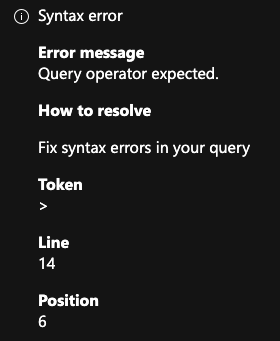
I haven't even bother trying to understand why… so moving on.
Claude (Sonnet 4.6) query returned:
// ============================================================
// THREAT HUNT: PowerShell Defender Folder Exclusion Attempts
// Scope: Last 30 days | Tables: DeviceProcessEvents
// Requirements: User-writable paths, normalized, prevalence-sorted
// ============================================================

// Step 1: Capture all candidate events
let RawExclusionCmds = DeviceProcessEvents
| where Timestamp > ago(30d)
// Target PowerShell launchers only
| where FileName in~ ("powershell.exe", "pwsh.exe")
    or InitiatingProcessFileName in~ ("powershell.exe", "pwsh.exe")
// Must reference Defender exclusion cmdlets or COM/WMI equivalents
| where ProcessCommandLine has_any (
    "Add-MpPreference",
    "Set-MpPreference",
    "MSFT_MpPreference",
    "AddExclusion",
    "ExclusionPath",
    "ExclusionExtension",        // include to avoid missing mixed commands
    "DisableRealtimeMonitoring"  // sometimes paired with exclusions
)
// Must explicitly mention a path/folder-based exclusion parameter
| where ProcessCommandLine has_any (
    "-ExclusionPath",
    "-ExclusionProcess",         // occasionally abused with folder refs
    "ExclusionPath ="
)
// ── Requirement 2: User-writable paths only ──────────────────
// Must reference at least one user-writable path root
| where ProcessCommandLine has_any (
    // User profile locations
    "\\Users\\",
    "\\AppData\\",
    "\\Temp\\",
    "\\Tmp\\",
    "%TEMP%",
    "%TMP%",
    "%APPDATA%",
    "%LOCALAPPDATA%",
    "%USERPROFILE%",
    "$env:TEMP",
    "$env:TMP",
    "$env:APPDATA",
    "$env:LOCALAPPDATA",
    "$env:USERPROFILE",
    // Public/shared writable
    "\\Public\\",
    "\\ProgramData\\",
    // Windows writable system temp paths
    "\\Windows\\Temp\\",
    "\\Windows\\Tasks\\",
    "\\Windows\\Tracing\\",
    // Downloads, Desktop, Documents
    "\\Downloads\\",
    "\\Desktop\\",
    "\\Documents\\",
    // Drive roots (broad catch — commonly abused)
    "C:\\Temp",
    "C:\\Tmp",
    "D:\\Temp",
    // Common staging locations seen in the wild
    "\\Recycle",
    "\\$Recycle.Bin",
    "\\Perflogs"
);
// Step 2: Normalize paths — replace per-user SIDs and usernames
// so the same command for different users collapses to ONE row.
// Normalize common variable forms and path roots.
let NormalizedCmds = RawExclusionCmds
| extend NormalizedCmd = ProcessCommandLine
    // Collapse full user profile paths: C:\Users\<anyone>\ → C:\Users\<USER>\
    | extend NormalizedCmd = replace_regex(NormalizedCmd,
        @'(?i)[A-Za-z]:\\[Uu]sers\\[^\\]+\\',
        @'C:\Users\<USER>\')
    // Collapse environment variable with username embedded
    | extend NormalizedCmd = replace_regex(NormalizedCmd,
        @'(?i)%USERPROFILE%',
        @'C:\Users\<USER>')
    | extend NormalizedCmd = replace_regex(NormalizedCmd,
        @'(?i)\$env:USERPROFILE',
        @'C:\Users\<USER>')
    // AppData variants
    | extend NormalizedCmd = replace_regex(NormalizedCmd,
        @'(?i)%APPDATA%',
        @'C:\Users\<USER>\AppData\Roaming')
    | extend NormalizedCmd = replace_regex(NormalizedCmd,
        @'(?i)%LOCALAPPDATA%',
        @'C:\Users\<USER>\AppData\Local')
    | extend NormalizedCmd = replace_regex(NormalizedCmd,
        @'(?i)\$env:APPDATA',
        @'C:\Users\<USER>\AppData\Roaming')
    | extend NormalizedCmd = replace_regex(NormalizedCmd,
        @'(?i)\$env:LOCALAPPDATA',
        @'C:\Users\<USER>\AppData\Local')
    // TEMP/TMP
    | extend NormalizedCmd = replace_regex(NormalizedCmd,
        @'(?i)%TEMP%|%TMP%',
        @'C:\Users\<USER>\AppData\Local\Temp')
    | extend NormalizedCmd = replace_regex(NormalizedCmd,
        @'(?i)\$env:TEMP|\$env:TMP',
        @'C:\Users\<USER>\AppData\Local\Temp')
    // Normalize drive letter casing
    | extend NormalizedCmd = replace_regex(NormalizedCmd,
        @'^[a-z]:\\',
        @'C:\');
// Step 3: Compute prevalence per normalized command
// and capture the full latest log row per unique command.
let Prevalence = NormalizedCmds
| summarize
    Prevalence       = count(),                          // Req 1: count for sorting
    DistinctDevices  = dcount(DeviceId),
    DistinctUsers    = dcount(AccountName),
    FirstSeen        = min(Timestamp),
    LastSeen         = max(Timestamp)
    by NormalizedCmd;
// Step 4: Get the FULL log row at the latest occurrence of each command
let LatestRows = NormalizedCmds
| summarize arg_max(Timestamp, *)                        // Req 4: full log, latest time
    by NormalizedCmd;
// Step 5: Join and produce final output
Prevalence
| join kind=leftouter LatestRows on NormalizedCmd
| project
    // ── Hunting Summary ──────────────────────────────────────
    Prevalence,
    DistinctDevices,
    DistinctUsers,
    FirstSeen,
    LastSeen,
    // ── Normalized unique command (Req 3) ────────────────────
    NormalizedCmd,
    // ── Full log fields from latest event (Req 4) ────────────
    Timestamp,
    DeviceId,
    DeviceName,
    AccountDomain,
    AccountName,
    AccountSid,
    ActionType,
    FileName,
    FolderPath,
    SHA256,
    MD5,
    ProcessId,
    ProcessCommandLine,          // raw original for forensics
    InitiatingProcessFileName,
    InitiatingProcessCommandLine,
    InitiatingProcessParentFileName,
    InitiatingProcessAccountName,
    InitiatingProcessId,
    InitiatingProcessParentId,
    ReportId
// ── Requirement 1: Most prevalent first ──────────────────────
| sort by Prevalence desc, LastSeen desc
This rather long query worked right away despite some flaws in the logic I am highlighting below. The coding style (comments, etc) looks great though!
Human Query (from little old me):
let IOARegex = @"(?i)(add|set)-MpPreference[\s\S]+ExclusionPath";
let PathRegex= @"(?i)(c:|\$env:(HOMEDRIVE|SYSTEMROOT)).*\\(users|programdata|windows[\\]+temp)\\|\$env:(TEMP|TMP|APPDATA|LOCALAPPDATA|PROGRAMDATA|PUBLIC|USERPROFILE|HOMEPATH|ALLUSERSPROFILE|ONEDRIVE|DESKTOP|DOCUMENTS|DOWNLOADS|FAVORITES)";
search in(DeviceProcessEvents, DeviceEvents) "MpPreference" and "ExclusionPath" and ("add" or "set")
| where Timestamp > ago(30d)
| where ActionType has_any("PowerShellCommand", "ProcessCreated", "ScriptContent")
| extend ScriptContent = parse_json(AdditionalFields)["ScriptContent"]
| extend AFCommand= parse_json(AdditionalFields)["Command"]
| extend PsCommand=case(
  ScriptContent matches regex IOARegex, ScriptContent,
  ProcessCommandLine matches regex IOARegex, ProcessCommandLine,
  AFCommand matches regex IOARegex, AFCommand,
  InitiatingProcessCommandLine)
| where PsCommand matches regex PathRegex
| summarize DevCount=dcount(DeviceId), arg_max(Timestamp, *) by PsCommand
| sort by DevCount
The Verdict
This is of course a simple exercise. Prompt engineering is a separate practice on itself. Also, consider that agents with multiple code iterations might provide better output (and perhaps a higher token cost…).
The goal here isn’t to prove that an experienced hunter will always win. It’s to assess where AI models stand today, what they get right, where they fall short, and how we can use that understanding to make them work better.
Coding Length / Style
While my code has only 15 lines, removing the single row comments, ChatGPT generated 55 lines and Claude, 121!
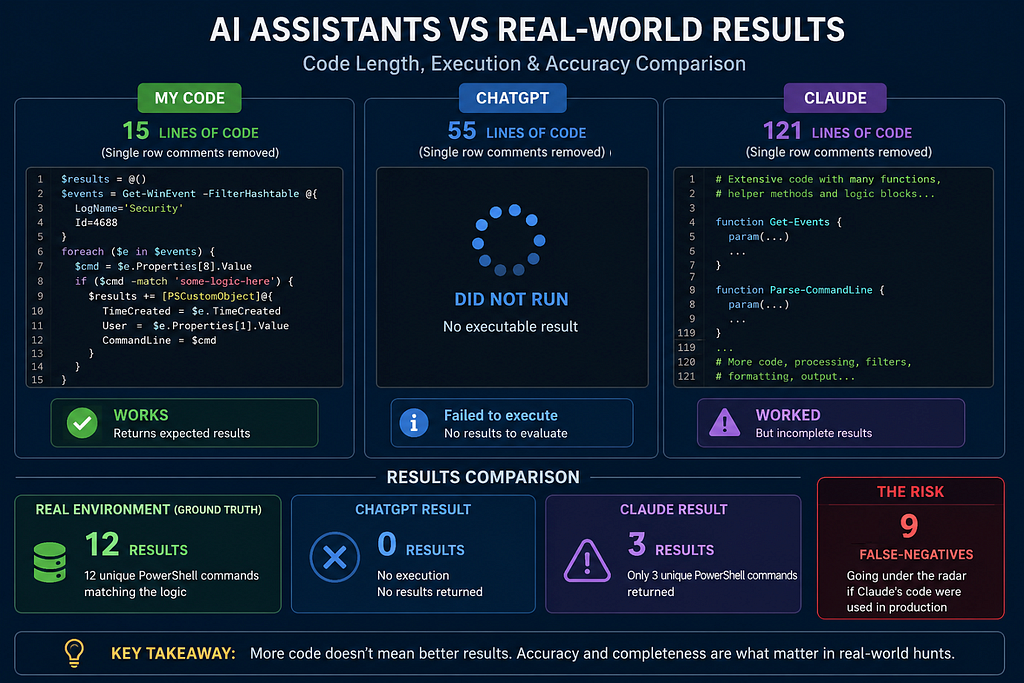 Quick summary of the results
I'm not providing any comment in my query but even if you add one comment per line, that would be significantly less.
Code maintainability is definitely a factor to consider, sometimes a controversial one. The fact is ChatGPT did not even run while Claude's worked but haven't provided the expected results.
In one of the real environments the queries were tested, I got 12 results from my hunt query. That means, 12 unique PS commands matching the logic, while Claude's only provided 3 results.
That's 9 false-negatives going under the radar, in case someone would have used Claude's code in production for such hunt.
Domain Knowledge & Experience Pays Off
Here are a few worth-noting points when comparing the queries:
- Both LLMs scoped the hunt against the DeviceProcessEvents table only, which accounts for ~30% of the results only. The DeviceEvents table keeps surprising me with such rich telemetry it provides.
- While ChatGPT scoped on 3 processes (powershell.exe, pwsh.exe, powershell_ise.exe), Claude only focused on the 2 primary ones, excluding the Windows PowerShell Integrated Scripting Environment (ISE).
- My approach is to simply focus on the ActionType field in combination with regular expressions matching against the command lines, regardless of the interpreter process used.
- While Claude uses a long| project command to display only certain fields, as always, I do use summarize's arg_min()or arg_max()so that I can capture the entire earliest or latest event matched, which also easily passes the Defender's Hunting-to-Detection query requirements.
- Using (and abusing) Regular Expressions (RegEx) for matching file paths is a common trace found in most of my queries. Claude's query managed to partially use that and even monitor for environment variables, which was a good surprise.
- Another good and unexpected point from Claude's take was the use of path normalization on "Users/<value>" which I also use a lot but not so relevant in this context.
The Prevalence Component
When it comes to “Prevalence”, it’s still very subjective but I do tend to draw that information from the number of devices or users (in this order) which is what Claude also assumed to my surprise. That's awesome!
ChatGPT picked the total number of events observed to draw prevalence instead, which I guess it's what most people will likely do as well.
Since this is an utterly important topic, I have written a full article about it. Go check it out and please share your feedback.
 Data Prevalence: The Game Changer for Blueteams
Hey, the robot taught me something!
One thing I noticed when comparing the queries was that Claude suggested a few more file paths that seem to be writable by default on modern Windows, not covered in my hunting query, so kudos to it!
Here are them:
- \Windows\Tracing\
- C:\$Recycle.Bin (shame on this errant human!)
And that brings me to the use case where I believe LLMs are making undeniable progress: reviewing and improving human-written queries.
Build a prototype, pass through a solid LLM like Anthropic's and you likely will find ways to improve it!
And that's among other use cases I'm already helping customers with:
- Code-to-Documentation generation
- Automatic hunt/detection deployment
- Code review & validation (Best Practices)
That doesn't mean an AI model will never be able to autonomously hunt, surely there are companies already selling you this idea but it will take some time before that happens and I'm sure SMEs will be involved.
So that's it. What have I missed? How would you use AI differently here? Send me your feedback via LinkedIn, Email or in the comments below!
Further Resources on PowerShell Hunting
- Bi Yue Xu (MS Researcher) recently wrote a nice article on DETECT.FYI about PowerShell Defender XDR telemetry and how it can be used for hunts and detection, including some nice ActionType values to monitor.
- Wanna know more about regular expressions relevant for suspicious PowerShell hunting and detection? Make no mistake and check Ps.Exposed GitHub repository and website (new version coming soon)!
Human, Reviewed Hunt Query
There are definitely more paths to add, as it always does, but hopefully this serves as some inspiration for anyone willing to improve it!
let IOARegex = @"(?i)(add|set)-MpPreference[\s\S]+ExclusionPath";
let PathRegex= @"(?i)(c:|\$env:(HOMEDRIVE|SYSTEMROOT)).*\\(users|programdata|windows[\\]+(temp|tracing)|\$Recycle\.Bin)\\|\$env:(TEMP|TMP|APPDATA|LOCALAPPDATA|PROGRAMDATA|PUBLIC|USERPROFILE|HOMEPATH|ALLUSERSPROFILE|ONEDRIVE|DESKTOP|DOCUMENTS|DOWNLOADS|FAVORITES)";
search in(DeviceProcessEvents, DeviceEvents) "MpPreference" and "ExclusionPath" and ("add" or "set")
| where Timestamp > ago(30d)
| where ActionType has_any("PowerShellCommand", "ProcessCreated", "ScriptContent")
| extend ScriptContent = parse_json(AdditionalFields)["ScriptContent"]
| extend AFCommand= parse_json(AdditionalFields)["Command"]
| extend PsCommand=case(
  ScriptContent matches regex IOARegex, ScriptContent,
  ProcessCommandLine matches regex IOARegex, ProcessCommandLine,
  AFCommand matches regex IOARegex, AFCommand,
  InitiatingProcessCommandLine)
| where PsCommand matches regex PathRegex
| summarize DevCount=dcount(DeviceId), arg_max(Timestamp, *) by PsCommand
| sort by DevCount
Written by Alex Teixeira, Detection Engineering & Security Analytics SME
Don’t forget to subscribe and follow me to get notified about new stories!
Testing AI Threat Hunting against Real-World KQL: A Side-by-Side Test was originally published in Detect FYI on Medium, where people are continuing the conversation by highlighting and responding to this story.
Introduction to Malware Binary Triage (IMBT) Course
Looking to level up your skills? Get 10% off using coupon code: MWNEWS10 for any flavor.
Enroll Now and Save 10%: Coupon Code MWNEWS10
Note: Affiliate link – your enrollment helps support this platform at no extra cost to you.
1 post - 1 participant
Malware Analysis, News and Indicators - Latest topics

Sp123
"An underestimated security threat to organizations is employee apathy and burn out."
