Update Chrome: Google patches actively exploited vulnerability and 73 others
Google has issued updates for the Chrome browser, patching a number of high‑severity vulnerabilities.
Introduction to Malware Binary Triage (IMBT) Course
Looking to level up your skills? Get 10% off using coupon code: MWNEWS10 for any flavor.
Enroll Now and Save 10%: Coupon Code MWNEWS10
Note: Affiliate link – your enrollment helps support this platform at no extra cost to you.
The update includes fixes for 74 vulnerabilities, including one that is being actively exploited in the wild.
The stable channel has been updated to 149.0.7827.102/.103 for Windows/Mac, and 149.0.7827.102 for Linux, which will roll out over the coming weeks.
How to update Chrome
If you don’t want to wait for the rollout to reach you, manually updating is easy.
The easiest option is to allow Chrome to update automatically. But you can end up lagging behind on updates if you never close your browser or if something goes wrong, such as an extension preventing the update.
To update manually, click the More menu (three dots), then go to Settings > About Chrome. If an update is available, Chrome will start downloading it automatically. Restart Chrome to complete the update, and you’ll be protected against these vulnerabilities.
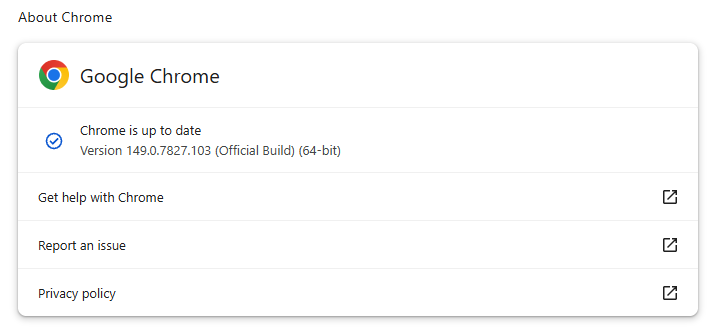 Chrome 149.0.7827.102/103 is up to date on Windows and Mac
You can also find step-by-step instructions in our guide to how to update Chrome on every operating system.
Technical details
The vulnerability that Google says is being exploited in the wild is tracked as CVE-2026-11645.
Google describes it as:
“Out of bounds read and write in V8 in Google Chrome prior to 149.0.7827.103 allowed a remote attacker to execute arbitrary code inside a sandbox via a crafted HTML page.”
This means this flaw was found in Chrome’s V8 engine—the part of Chrome (and other Chromium-based browsers) that runs JavaScript.
Such a flaw allows a program to read or write outside the memory boundaries it is supposed to use, enabling attackers to manipulate other areas of memory allocated to more critical functions. Attackers may be able to place malicious code in memory and trick the system into running it.
In this case, the vulnerability could be triggered when V8 processes specially crafted HTML content, such as a malicious website.
The phrase “inside a sandbox” means the malicious code would run in a restricted, sealed-off environment rather than directly on your whole computer. An attacker’s code is constrained to the browser, which lowers the impact compared with code running outside the sandbox. However, attackers often chain multiple vulnerabilities together to achieve more serious compromises. So, the phrase is a security limiter, not a reassurance that the bug is harmless.
The update also includes some new features, like the ability to sign PDF forms without using an extension.
Stop threats before they can do any harm.
Malwarebytes Browser Guard blocks phishing pages and malicious sites automatically. Free, one click to install. Add it to your browser →
Article Link: https://www.malwarebytes.com/blog/bugs/2026/06/update-chrome-google-patches-actively-exploited-vulnerability-and-73-others
1 post - 1 participant
Malware Analysis, News and Indicators - Latest topics

Sp123
"An underestimated security threat to organizations is employee apathy and burn out."
