Threat Hunting with Osquery Manager
Threat hunting does not rely solely on logs. There are situations where telemetry is incomplete, delayed, or does not reflect what is currently happening on an endpoint. In these cases, having direct visibility into the host state becomes essential.
osquery provides this visibility by allowing analysts to query operating system artifacts using a structured, SQL-like approach. In this blog, we explore when and why osquery is useful for threat hunting, then walk through a realistic command-and-control scenario, and finally show how hunting results can be extended into detection and YARA-based scanning.
What, Why and How we Use osquery for Threat Hunting
What is osquery?
osquery is an open-source endpoint instrumentation framework that exposes operating system data as relational tables. It allows analysts to query processes, network connections, files, registry keys, services, users, and more using SQL syntax.
osquery manager is an integration that helps us run queries across multiple endpoints, schedule hunts, and send results to Elasticsearch this is what we are going to use in this post

Why Use osquery?
- Cross-platform support (Windows, Linux, macOS)
- Ability to join multiple tables for deeper correlations
- Efficient bulk validation across multiple endpoints
- Near real-time visibility into endpoint state
A critical limitation to keep in mind is that osquery is primarily state-based. It shows what exists at query time, not necessarily what happened in the past. This makes it particularly effective for investigations and targeted hunts rather than long-term historical analysis.
How osquery Works
osquery models operating system data as tables. Files, processes, sockets, and registry keys… can be queried as structured datasets. This allows hunters to apply filtering, joins, and sorting logic in a predictable and repeatable way.
check out the osquery tables here : https://osquery.io/schema/5.20.0/
Scenario 1: Suspicious File Hash Investigation
When a suspicious executable is identified on disk, retrieving its hashes is often one of the first investigation steps.
Using osquery, you can collect multiple hashes in a single query and pivot into threat intelligence platforms or internal datasets for enrichment and correlation.
The query below retrieves MD5, SHA1, and SHA256 hashes for a specified file path :
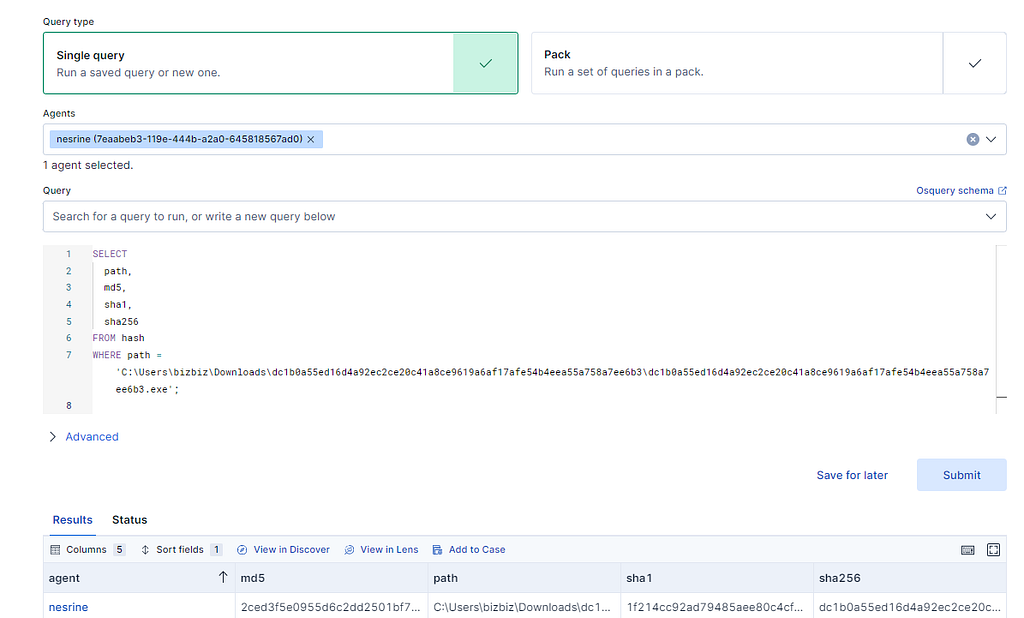
This step is simple but foundational, as it helps establish whether the file is known, benign, or associated with malicious activity.
Scenario 2: Real-Time Socket State and C2 Beaconing
We simulated an advanced persistent threat-style compromise using the Sliver C2 framework. An HTTP beacon was deployed on a Windows endpoint and configured to periodically communicate with the attacker’s infrastructure over port 8080.
The goal was to see this behavior using osquery by correlating process execution with live network connections.
Here’s the query that joins process and socket tables to identify external connections:

By joining these tables, we can identify which processes are communicating externally and understand their execution context.
Here is a better explanation:
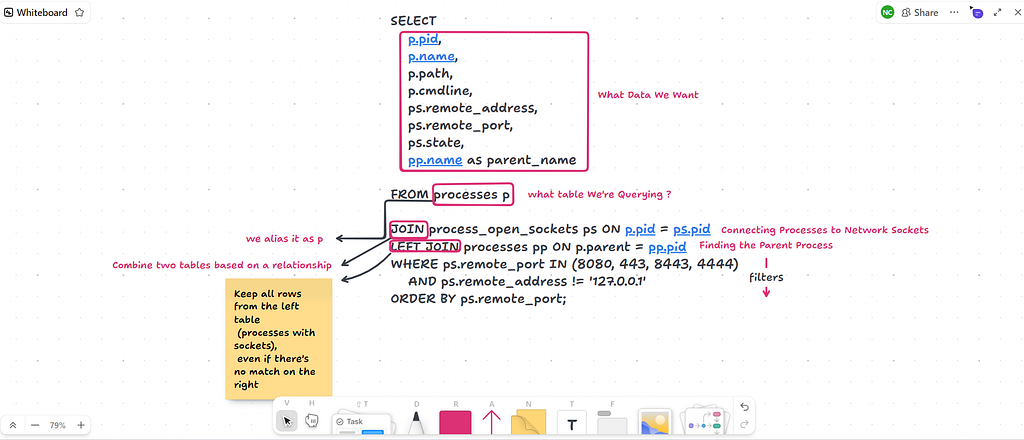
This hunt focuses on:
- External network connections (excluding localhost).
- Active or recently closed socket states.
- Parent-child process relationships for additional context.
- Sorting by remote port to highlight anomalies.
It is important to note that not every external connection is malicious. Browsers, update services, and security agents will appear in results. The value of this hunt lies in context and pattern analysis rather than standalone indicators.
You can find more hunting scenarios in my previous posts.
Now let’s look at how osquery integrates with YARA for malware detection.
Scanning with YARA via osquery
osquery also provides a <strong>yara</strong> table that enables scanning files or directories using YARA rules.
This allows analysts to:
- Scan targeted directories such as Downloads or Temp
- Detect known malware families
- Validate suspicious files discovered during hunts
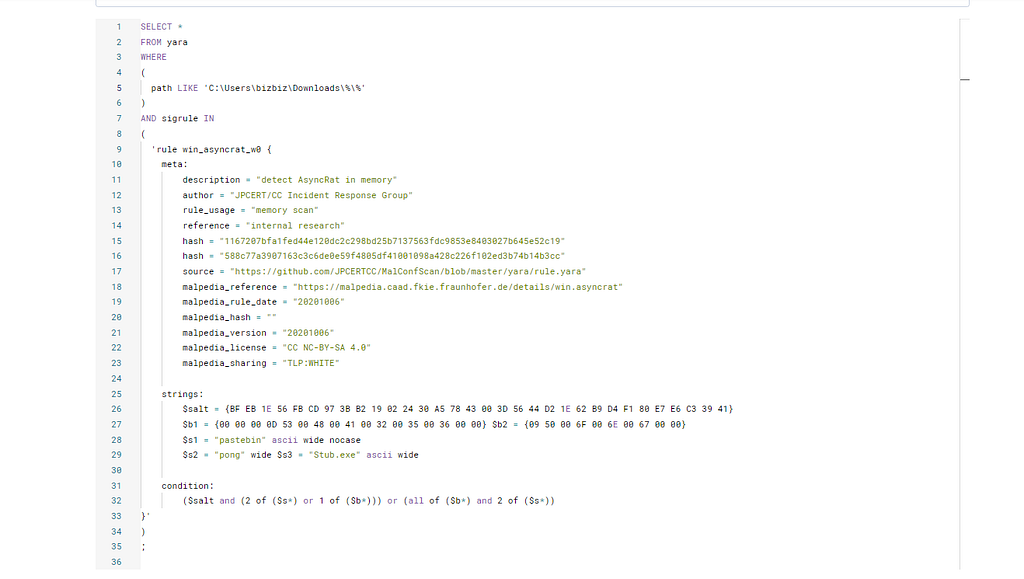
In this scenario, a YARA rule for AsyncRAT was used to scan a directory and return positive matches only. While powerful
Please note that YARA scans should be scoped carefully to avoid performance impact.
Example query scanning a directory with AsyncRAT signatures :

osquery is a precise investigative tool that excels at host-level visibility and rapid hypothesis validation. It enables hunters to correlate processes, network activity, and file system data in a structured and repeatable way.
When combined with Elastic and YARA, osquery supports the full investigation lifecycle, from initial suspicion to validated detection. Used correctly, it significantly improves investigation efficiency and confidence.
Thanks for reading! Hope this helps with your hunting. More posts coming soon…
Threat Hunting with Osquery Manager was originally published in Detect FYI on Medium, where people are continuing the conversation by highlighting and responding to this story.
Introduction to Malware Binary Triage (IMBT) Course
Looking to level up your skills? Get 10% off using coupon code: MWNEWS10 for any flavor.
Enroll Now and Save 10%: Coupon Code MWNEWS10
Note: Affiliate link – your enrollment helps support this platform at no extra cost to you.
Article Link: https://detect.fyi/threat-hunting-with-osquery-manager-2a32818e735a?source=rss----d5fd8f494f6a---4
1 post - 1 participant
Malware Analysis, News and Indicators - Latest topics

Sp123
"An underestimated security threat to organizations is employee apathy and burn out."
