The Hidden Security Risk in Microsoft Teams: Detecting AI Note-Taking Bots with KQL
How security teams can detect unauthorized AI meeting bots using Microsoft Advanced Hunting and KQL.
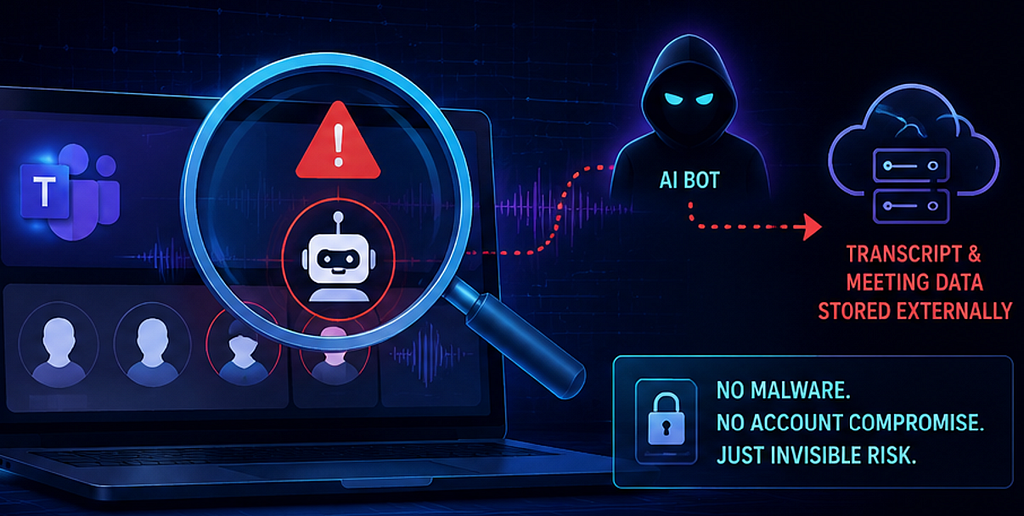
Imagine this scenario.
Your team hosted a Microsoft Teams meeting discussing a confidential project with several external partners. Everything seemed routine until months later you discovered the entire conversation was captured and stored outside your organization.
No breach.
No malware.
No compromised account.
The culprit? A third-party AI note-taking bot.
Situations like this are becoming more common as AI note-taking bots like those from Fireflies.ai, Otter.ai, or Read.ai can automatically join meetings, record conversations, generate transcripts and store them externally. Depending on how these tools are configured, this can occur without full awareness or explicit consent from everyone in the meeting.
This has already escalated into legal challenges in some cases. In Brewer v. Otter.ai and Cruz v. Fireflies.AI Corp., plaintiffs allege that AI note-taking bots recorded conversations without required notice or consent, with the Fireflies case further alleging unlawful collection of biometric voice data.
Third-party AI note-taking bots typically join Microsoft Teams meetings through calendar integrations. An external user can grant permission to allow such AI bots to access their calendar. When this user is invited to your Teams meeting, the AI bot can automatically join the meeting as a participant. Depending on Teams meeting’s settings, the bot may wait in the meeting lobby until admitted.
Many believe that Teams lobby admission events are not available in Microsoft Defender XDR. However, after working with the Microsoft product team, it is confirmed that Teams meeting participant details, including lobby admission events, can be retrieved through Advanced Hunting in Defender XDR.
This blog walks through how security teams can extract Teams lobby admission events, identify unusual participants such as AI bots, and establish audit trail showing who admitted them into the meeting.
With this visibility, organizations can take proactive measures, such as blocking known AI bots at perimeter firewalls, implementing detection rules to monitor suspicious meeting participants, and educating users to carefully review unknown participants before admitting them from the lobby.
The MeetingParticipantDetail Events in CloudAppEvents Table
Let’s start by diving into the CloudAppEvents schema table in Defender Advanced Hunting, which contains “MeetingParticipantDetail” events for the Teams application. These events provide participant details, including whether the participant joined from the lobby, and the associated InviterInfo field which identifies who admitted them. The KQL query shown below extracts data from these events to display which participants joined from the lobby and who allowed them into the meeting.
CloudAppEvents
| where Application == "Microsoft Teams"
| where ActionType == "MeetingParticipantDetail"
| extend parsedData = parse_json(RawEventData)
| extend IsJoinedFromLobby = parsedData.IsJoinedFromLobby
| where IsJoinedFromLobby == "true"
| extend MeetingParticipantJoinTime = tostring(parsedData.JoinTime)
| extend MeetingDetailId = tostring(parsedData.MeetingDetailId)
| mv-expand attendee = parsedData.Attendees
| extend MeetingParticipantName = attendee.DisplayName
| extend MeetingParticipantUPN = attendee.UPN
| extend MeetingParticipantType = attendee.RecipientType
| extend inviter = attendee.InviterInfo
| extend InviterDisplayName = inviter.DisplayName
| extend InviterUPN = inviter.UPN
| extend InviteTime = inviter.InviteTime
| project MeetingParticipantJoinTime, MeetingParticipantName, MeetingParticipantUPN, MeetingParticipantType, IsJoinedFromLobby, InviterDisplayName, InviterUPN, InviteTime, MeetingDetailId
| sort by MeetingParticipantJoinTime asc
Specifically, this query filters for events where the IsJoinedFromLobby field is set to true and parses the RawEventData section to surface key details, including:
- MeetingParticipantName: the participant who waited in the lobby
- InviteTime: the time the participant entered the meeting but was waiting in the lobby
- Inviter: the person who admitted the participant from the lobby
- MeetingParticipantJoinTime: the time the participant was admitted from the lobby
To illustrate the query in action, let’s examine events from a Teams meeting that occurred in a fictitious organization. In this meeting, user B invited two external participants: Bi Yue at Microsoft (the Microsoft account) and another participant with a Gmail address (the Gmail account). The following sequence of meeting events serves as a reference when interpreting the results from the KQL query.
- 3:30 am UTC: The Microsoft account entered the meeting and waited in the lobby.
- 3:33 am UTC: User B started the Teams meeting.
- 3:35 am UTC: User B admitted the Microsoft account from the lobby into the Teams meeting.
- 3:37 am UTC: The Gmail account joined the meeting, entering the participant name as “My Gmail Account”, and waited in the lobby.
- 3:39 am UTC: User B admitted the Gmail account from the lobby into the meeting.
When the KQL query is executed, it displays the participants who joined from the lobby, including their MeetingParticipantName, MeetingParticipantUPN, and MeetingParticipantType. For this scenario, the query output shows two participants, “Bi Yue” and “My Gmail Account”, as illustrated in the screenshot below. It also indicates that user B admitted both participants from the lobby, along with user B’s UPN and the timestamp for each admission.
Below is the KQL query output for the Teams meeting scenario described earlier:

To find out which AI note-taking bots were admitted to meetings and by whom, we can update the previously mentioned KQL query with one additional filtering condition, such as where MeetingParticipantName has_any (“Fireflies”, “Spice AI”, “read.ai”, “Cresco AI”). This ensures the query only returns participants whose MeetingParticipantName field contains the defined AI bot keyword. You can always include names of other AI note-taking bots in the filtering condition, enabling detection of additional AI bots that may have accessed Teams meetings.
Here is the updated KQL query with the additional filtering condition:
CloudAppEvents
| where Application == "Microsoft Teams"
| where ActionType == "MeetingParticipantDetail"
| extend parsedData = parse_json(RawEventData)
| extend IsJoinedFromLobby = parsedData.IsJoinedFromLobby
| where IsJoinedFromLobby == "true"
| extend MeetingParticipantJoinTime = tostring(parsedData.JoinTime)
| extend MeetingDetailId = tostring(parsedData.MeetingDetailId)
| extend MeetingParticipantIP = tostring(parsedData.ClientIP)
| mv-expand attendee = parsedData.Attendees
| extend MeetingParticipantName = attendee.DisplayName
| extend MeetingParticipantUPN = attendee.UPN
| extend MeetingParticipantType = attendee.RecipientType
| extend inviter = attendee.InviterInfo
| extend InviterDisplayName = inviter.DisplayName
| extend InviterUPN = inviter.UPN
| extend InviteTime = inviter.InviteTime
| where MeetingParticipantName has_any ("Fireflies", "Spice AI", "read.ai", "Cresco AI")
| project MeetingParticipantJoinTime, MeetingParticipantName, MeetingParticipantUPN, MeetingParticipantIP, MeetingParticipantType, IsJoinedFromLobby, InviterDisplayName, InviterUPN, InviteTime, MeetingDetailId
This updated query displays each instance of an AI bot joining a Teams meeting, along with who admitted it from the lobby. This enables you to investigate individual events and understand how and when these bots accessed meetings.
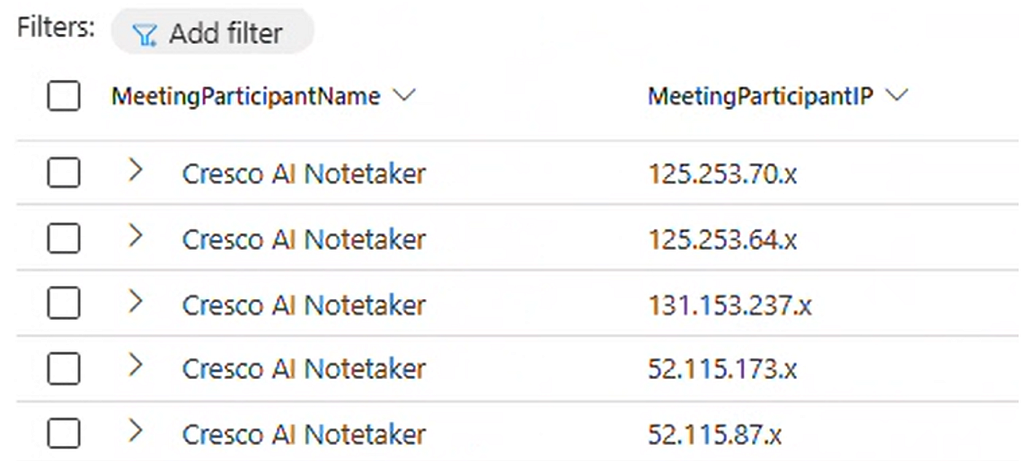
Additionally, the next KQL query can be used to generate a high-level summary of AI note-taking bots that have joined Teams meetings across the organization, including their corresponding source IP address ranges.
CloudAppEvents
| where Application == "Microsoft Teams"
| where ActionType == "MeetingParticipantDetail"
| extend parsedData = parse_json(RawEventData)
| extend IsJoinedFromLobby = parsedData.IsJoinedFromLobby
| where IsJoinedFromLobby == "true"
| extend MeetingParticipantJoinTime = tostring(parsedData.JoinTime)
| extend MeetingDetailId = tostring(parsedData.MeetingDetailId)
| extend MeetingParticipantIP = tostring(parsedData.ClientIP)
| mv-expand attendee = parsedData.Attendees
| extend MeetingParticipantName = attendee.DisplayName
| extend MeetingParticipantUPN = attendee.UPN
| extend MeetingParticipantType = attendee.RecipientType
| extend inviter = attendee.InviterInfo
| extend InviterDisplayName = inviter.DisplayName
| extend InviterUPN = inviter.UPN
| extend InviteTime = inviter.InviteTime
| where MeetingParticipantName has_any ("Fireflies", "Spice AI", "read.ai", "Cresco AI")
| summarize by tostring(MeetingParticipantName), MeetingParticipantIP
| sort by MeetingParticipantName asc
The following screenshot illustrates an example of the query results.
Furthermore, the MeetingParticipantDetail events offer other information that can be useful. For instance, the meeting organizer is included in there. Often, the person admitting participants from the lobby is not necessarily the organizer, so being able to determine who the actual organizer is can be helpful during investigation. The following updated KQL query includes the organizer details for added visibility.
CloudAppEvents
| where Application == "Microsoft Teams"
| where ActionType == "MeetingParticipantDetail"
| extend parsedData = parse_json(RawEventData)
| extend IsJoinedFromLobby = parsedData.IsJoinedFromLobby
| where IsJoinedFromLobby == "true"
| extend MeetingOrganizer = parsedData.UserId
| extend MeetingParticipantJoinTime = tostring(parsedData.JoinTime)
| extend MeetingDetailId = tostring(parsedData.MeetingDetailId)
| mv-expand attendee = parsedData.Attendees
| extend MeetingParticipantName = attendee.DisplayName
| extend MeetingParticipantUPN = attendee.UPN
| extend MeetingParticipantType = attendee.RecipientType
| extend inviter = attendee.InviterInfo
| extend InviterDisplayName = inviter.DisplayName
| extend InviterUPN = inviter.UPN
| extend InviteTime = inviter.InviteTime
| project MeetingOrganizer, MeetingParticipantJoinTime, MeetingParticipantName, MeetingParticipantUPN, MeetingParticipantType, IsJoinedFromLobby, InviterDisplayName, InviterUPN, InviteTime
| sort by MeetingParticipantJoinTime
One important caveat, MeetingParticipantDetail events are not real-time. In fact, there is a significant delay between when a Teams meeting occurs and when these events become available in Advanced Hunting. If a meeting takes place at 9:30 PM, the corresponding events may not appear in the Defender portal until approximately 8 hours later, around 5:30 AM the following day. However, even with this delay, having access to these insights allows you to stay proactive and maintain control over meeting security.
In conclusion, by leveraging Teams lobby admission events and Advanced Hunting in Defender XDR, security teams can gain clear visibility into external meeting participants and can better protect sensitive conversations from unintended exposure. This capability brings in much-needed visibility to an often overlooked security gap.
The Hidden Security Risk in Microsoft Teams: Detecting AI Note-Taking Bots with KQL was originally published in Detect FYI on Medium, where people are continuing the conversation by highlighting and responding to this story.
Introduction to Malware Binary Triage (IMBT) Course
Looking to level up your skills? Get 10% off using coupon code: MWNEWS10 for any flavor.
Enroll Now and Save 10%: Coupon Code MWNEWS10
Note: Affiliate link – your enrollment helps support this platform at no extra cost to you.
1 post - 1 participant
Malware Analysis, News and Indicators - Latest topics

Sp123
"An underestimated security threat to organizations is employee apathy and burn out."
